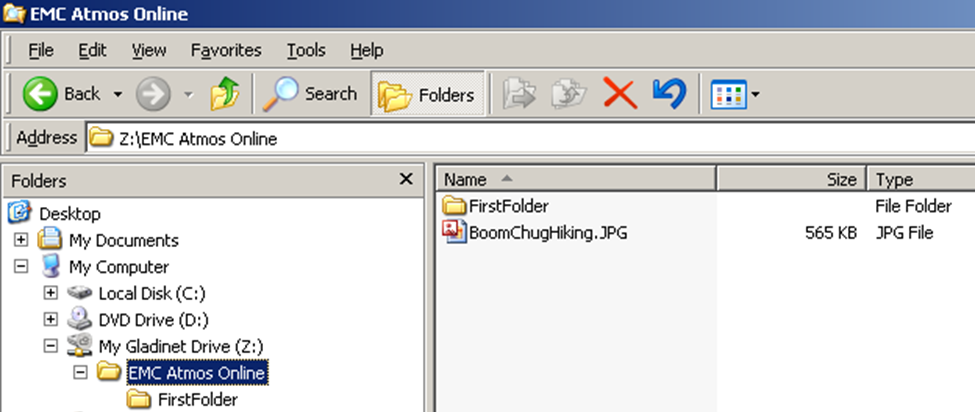

Ever since 'Zilla wrote his post about installing Gladinet on top of Atmos I've been wanting to give it a try. So I followed his instructions (very easy), and within moments of receiving my Atmos "uid" and "shared secret", Gladinet had created a "Z:" drive on my laptop.
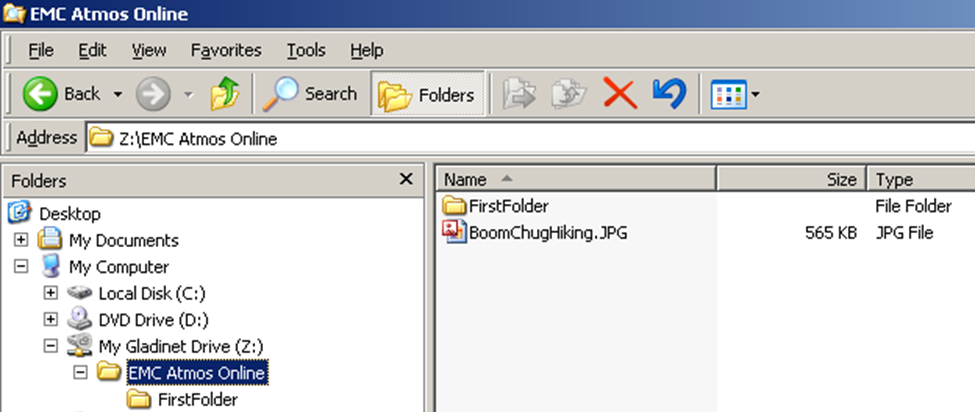
I navigated to my Z drive, dropped in a JPG, created a folder, and then dropped in another JPG. I was officially storing files in the Atmos-sphere. Here's a picture of the data I stored in my Z: drive.
Last year I had written several blog posts about the inner workings of Atmos. As Gladinet uploads files to Atmos, it should be possible for me to program the Atmos API directly to see what Gladinet is doing. So I navigated to the Atmos Online community and got my hands on the "QuickStart" document. I decided to program in the .NET environment, and the QuickStart document stepped me through it. The samples built and ran without a problem.
Given that Atmos stores "objects", I knew that I needed a way to find the top level objects in the Gladinet hierarchy. It took a few minutes to figure out that I needed to find an API that did NOT accept an object-id as input. The appropriate API was named "GetListableTags".
Once I called GetListableTags I started to see some metadata. To make a long story short, here is the code that I wrote.
EsuApiLib.Rest.EsuRestApi atmos_api = new
EsuApiLib.Rest.EsuRestApi("accesspoint.emccis.com", 80, uid, sharedSecret);
// call Atmos to get the top-level tags
MetadataTags tags = atmos_api.GetListableTags(tag);
for (int i = 0; i < tags.Count(); i++)
{
//iterate through each top level tag and print out the name
tag = tags.ElementAt(i);
Console.WriteLine("\nTag {0}:{1}", i, tag.Name);
foreach (ObjectId oid in atmos_api.ListObjects(tag))
{
// for each tag grab all object IDs and print out all object metadata
Console.WriteLine("\n oid {0}\n", oid.ToString());
ObjectMetadata obj_meta = atmos_api.GetAllMetadata(oid);
for (int j = 0; j < obj_meta.Metadata.Count(); j++)
{
Console.WriteLine(" {0,-12} {1}",
obj_meta.Metadata.ElementAt(j).Name,
obj_meta.Metadata.ElementAt(j).Value);
}
}
}
And here is the data that gets dumped out when I run the code against the online Atmos account backing my Gladinet Z: drive:
Tag 0:GCDHOST
oid 4980cdb2a110105e04980d61b3e98204a8069ad563b5
GCDName BoomChugHiking.JPG
atime 2009-08-10T18:40:45Z
mtime 2009-08-10T18:40:45Z
ctime 2009-08-10T18:40:45Z
itime 2009-08-10T18:40:45Z
type regular
uid EMC00270299F451F0E87
gid apache
objectid 4980cdb2a110105e04980d61b3e98204a8069ad563b5
size 578067
nlink 0
policyname
default
GCDHOST BoomChugHiking.JPG
oid 4980cdb2a310105e04980d61b65b5904a8069c447b45
GCDTYPE Directory
GCDName FirstFolder
atime 2009-08-10T18:41:14Z
mtime 2009-08-10T18:41:08Z
ctime 2009-08-10T18:41:14Z
itime 2009-08-10T18:41:08Z
type regular
uid EMC00270299F451F0E87
gid apache
objectid 4980cdb2a310105e04980d61b65b5904a8069c447b45
size 0
nlink 0
policyname default
GCDHOST FirstFolder
Tag 1:FirstFolder
oid 4980cdb2a510105e04980d61ba265004a806a06722bd
GCDName tfc.JPG
atime 2009-08-10T18:42:15Z
mtime 2009-08-10T18:42:15Z
ctime 2009-08-10T18:42:15Z
itime 2009-08-10T18:42:14Z
type regular
uid EMC00270299F451F0E87
gid apache
objectid 4980cdb2a510105e04980d61ba265004a806a06722bd
size 2565454
nlink 0
policyname default
/FirstFolder tfc.JPG
The API retrieved three objects: the two JPG files and the folder that I had created.
What's going on behind the scenes with Gladinet and Atmos? If you take a look at the data you can start to guess. I plan on trying to introduce another object or two behind Gladinet's back and see what happens. More on that in a future post.
The main point here is that it's very easy to get started.
Steve
http://stevetodd.typepad.com
Twitter: @SteveTodd